Coalescing operator rules in JavaScript

Coalescing rules in JavaScript can be confusing especially when you first learn the language. The first case we are going to look at is the plus operator.

  1. number + number = number
  2. number + string = string
  3. string + string = string
  4. bool + number = number
  5. bool + bool = number
  6. bool + string = string

Rule 1 is not surprising 1+2 = 3.  That’s what we all expect.  Its the other rules that may surprise people.  Rule 2 means that 3 + ‘hello’ = ‘3hello’.  The reason for this is that because the right hand operand is a string the number 3 gets coalesced into a string ‘3’ and then the plus operator acts as a concatenation.  Rule 2 also means that ‘1’ + 2 = ’12’ for the same reason the fact that ‘1’ could be converted to a number does not come into play.  Rule 3 will be obvious to people who have used other programming languages ‘hello’ + ‘ world’ = ‘hello world’.  Because both operands are strings + simply acts as a concat operator.  Rule 4 will probably catch a lot of people out.  When one operand is a bool and the other is a number the bool is converted to a number with false being 0 and true being 1.  So false + 2 = 2 and true + 2 = 3.  Rule 5 is a logical extension of rule 4.  When both operands are bool then they are both treated as numbers using the same values as before so true + false = 1.  Rule 6 is slightly odd as now bools behave totally differently.  When a bool is operated on with a string the bool is converted to a string instead of a number as in rules 5 and 6.  So true + ‘world’ = ‘trueworld’.  Think of it like calling ToString() in .net on the boolean.

Now that we have established some of the rules of how types behave when they are combined with other types we can see why it is important to know the difference between == and === in JavaScript. Let’s start with ===. === says look at both operands if the types are different then the expression is false, if the types are the same then compare them.  This is logically what most people would expect so:

  • 2 === ‘hello’ = false
  • 3 === true = false
  • 3 === false = false
  • ‘hello’ === ‘world’ = false
  • ‘3’ === 3 = false
  • 1 === true = false

Notice the last 2 of the six cases above.  We are comparing the string 3 to the number 3.  This is false because one side is a string and the other is a number so the expression is false regardless of the values.  1 === true = false because again both types are different.

This is where the important difference comes in with the == operator.  The == operator says first change both coalesce both of the types then compare.  Here are the expressions again using == operator:

  • 2 == ‘hello’ = false
  • 3 == true = false
  • 3 == false = false
  • ‘hello’ == ‘world’ = false
  • ‘3’ == 3 = true
  • 1 == true = true

Notice how now the last 2 expressions are true.  This is because the number 3 is turned into the string 3 because the types are different and then the string ‘3’ is compared to the string ‘3’ which is the same.  The last expression may be surprising that its true but its true for the same reason.  The bool true is first converted to the number 1 and then the number 1 is compared to the number 1 which is true.

Before I close this blog post I would like to address one more rule which surprises people.  When using the minus operator the rules change slightly from the plus operator above.  The rules change when you have a string and a number.  Whereas for plus that results in a concatenation, when you minus a string from a number or vice versa the string is first converted to a number and then the minus operation takes place.  Therefore ‘7’ – 5 = 2 because the ‘7’ is converted to a number.  ‘hello’ – 1 = NaN (not a number) because you can’t convert the string ‘hello’ to a number.


JavaScript Falsy Values

Having read Douglas Crockford’s fabulous Javascript the good parts book I wanted to point out one of the biggest gotchas in JavaScript… Which values are false?

There are 6 values that evaluate to false in JavaScript, EVERYTHING else will evaluate to true.  The 6 falsy values in JavaScript are:

  • 0  – the number 0
  • NaN – not a number)
  • ” – the empty string
  • false – the boolean value false
  • null
  • undefined

This can lead to some surprising values being true for example:


if ('0') { // this is true
if ('false') { // this is true
if (' '){ // this is true

The top value is true because we are testing the string 0 not the number 0. The second one is true because we are testing the string ‘false’ and not the Boolean false. The last one is true because the string is not empty – it has a single space character.

So remember if you are not dealing with one of the 6 values above then the answer is true… simples!

AngularJS vs Facebook React Cage Match

Currently I am working on an enterprise application with an AngularJS frontend and Web API backend.  In parts of the application the page load time in unbearable.  This is especially noticeable on pages with Angular repeater directives with around 100 items or more (even in Chrome).  This lead me to look at how we could speed up these slow pages and I stumbled across Facebook React.

The following demo is well worth checking out if you haven’t heard of Facebook React:

Facebook React is built for speed. The rendering model takes a very different approach to other two way binding libraries such as AngularJS or Knockout. Traditionally two way binding libraries rebuilt every changed element in the DOM every time any element changes.  This can obviously lead to redundant work. Facebook react works in a different way.  It builds a virtual DOM in the background and computes the minimum set of operations needed to transform the virtual DOM based on the changes made. This means that there are no wasted operations. This is a bit like the concept that is used in a 3D games where objects that are completely hidden from vision are not drawn and then drawn over they are simply not drawn at all.

To test which is faster I have built a simple angular app that tests an Angular repeater against a react component. The app simply creates an array of x size and then binds that array to the Angular repeater or React component (depending which button you click) and times it.

To implement the app I started with the angular-seed project as it gives you an out of the box AngularJS app (complete with node web server).  For angular I am using a straight forward repeater bound to the array.  To time how long the binding takes in angular I am using a directive:

.directive('postRepeatDirective', ['$timeout',  function($timeout) {
	return {
		link: function(scope, element) {
			if (scope.$last){
				$timeout(function(){
					var end = new Date();
					$('#results').text("## Angular rendering list took: " + (end - scope.startTime) + " ms");
				});
			}
		}
	}
	}

This function checks for when the $last element is bound by the ngRepeat directive. When it is it assumes that all of the elements have been bound so it stops the timer. The start time is set when you click the button.

For Facebook React things are very similar. Except we are using a directive to do all of the work:

directive('reactRepeater', [function() {
    return {
      restrict: 'E',
      link: function(scope, element) {
        scope.$watch('reactArray', function(newVal, oldVal) {

          React.renderComponent(ReactResults({
            array: scope.reactArray
          }), document.getElementById('reactResults'), function(){

          	var end = new Date();
          	if (scope.reactArray.length > 0){
        		$('#results').text("## React rendering list took: " + (end - scope.startTime) + " ms");
        	}
          });
        }, true);

      }
    }
}])

We are using this directive to delegate the rendering to react. React has a method called renderComponent. It’s first argument is the component you want to render. We are rendering our ReactResults component and passing it the array. The second argument is the element where you want that component to render. The third argument is a callback that fires when React has finished rendering the component so this is where we can put our timing logic.

The React component looks like:

var ReactResults = React.createClass({
  render: function() {

   var results = [];
   for(var i=0; i<this.props.array.length; i++){
   	results.push(React.DOM.p({}, 'Hello'))
   }

    return React.DOM.div({}, results);
  }
});

The astute reader will have noticed that we are still using AngularJS to watch the array. Indeed we are and this will alter the results. The reason for this is that I wanted to test React in the context of using it just for the rendering inside an AngularJS app. React only provides rendering capabilities. As is stated on React’s site they are the V in View in the usual MV* para-dime. You still need a framework to combine with React to get all of the other goodness you normally want when building a rich web application.

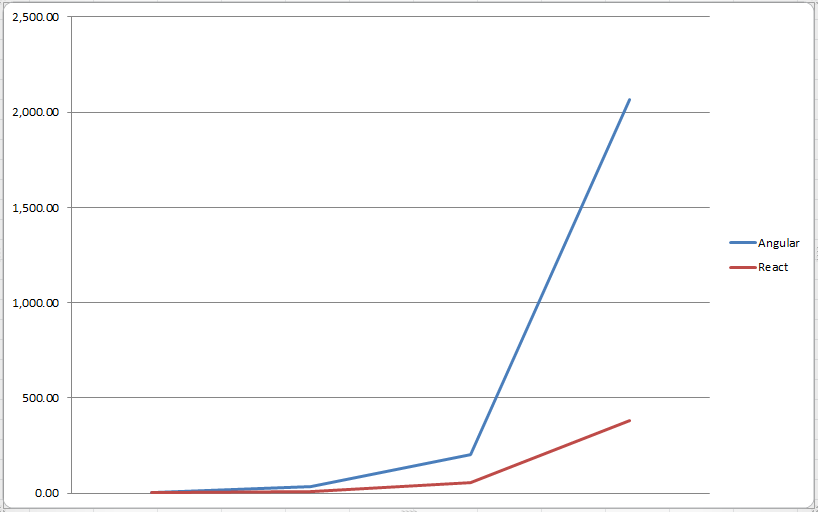
Onto the results. The following data shows how long it took Angular and React to render ever increasing numbers of array elements.  The times are in milliseconds.

Elements Angular React
10 5.33 2.00
100 35.00 9.33
1,000 201.33 57.67
10,000 2,064.67 383.00


chart


As I tried to increase the number of elements further Angular started to crash my browser :(.  As you can see from the graph above Angular is on an exponential curve as the number of elements increase.

The data confirms what is promised by the React guys. That React is a lightning fast rendering framework. Remember it has been hampered in these tests as it was bootstrapped by Angular!  The test proves that due to the modular nature of Angular it is easy to swap out the rendering part with another rendering engine such as React. This means that if you have an existing Angular application and you want a performance increase then using React components inside directives is a good solution.

To reiterate again Angular does give you a nice structure to your code. So using it along with something like React gives you both an awesome framework for structuring large applications and a fast(er) rendering than you would out of the box with Angular.

The code used for these tests is all up in github so you can run them for yourselves.  You will need node and git installed . If you want to run the application yourself follow these instructions:

git clone git@github.com:kevholditch/AngularVsReact.git
cd AngularVsReact
npm install
node ./scripts/web-server.js

Now the app should be running. Access it by hitting http://localhost:3000/app/index.html. Give it a try. As always comments welcome. I would be keen to hear of your experiences with Angular and React.

BuilderFramework – Dependent steps

Last time I started to detail about a new open source builder framework that I was writing. Today I wanted to speak about dependent steps.

It is important for the builder to support dependent steps. For example you might have one step to create an order and another step to create a customer. Obviously the step to create the customer will need to run before the step to create the customer. When reversing these steps they will need to run in the opposite order.

To manage this I have written an attribute DependsOnAttribute. This attribute takes a type as it’s constructor parameter.  The attribute allows you to annotate which steps your step depends on. For example:


public class CreateCustomerStep : IBuildStep { ...

[DependsOn(typeof(CreateCustomerStep))]
public class CreateOrderStep : IBuildStep { ...

To support this the commit method needs to sort the steps into dependency order. It also needs to check for a circular dependency and throw an exception if one is found. We are going to need a separate class for managing the sorting of the steps (remember single responsibility!). The interface is detailed as follows:

public interface IBuildStepDependencySorter
{
    IEnumerable Sort(IEnumerable buildSteps);
}

Before we implement anything we need a set of tests to cover all of the use cases of the dependency sorter.  That way when all of the tests pass we know that our code is good. I always like to work in a TDD style.  (The tests I have come up with can be seen in depth on the github source page or by cloning the source).

At a high level these are the tests we need:

  • A simple case where we have 2 steps where one depends on the other
  • A simple circular reference with 3 steps throws an exception
  • A complex circular reference with 5 steps throws an exception
  • A more complex but valid 4 step dependency hierarchy gets sorted correctly
  • A multiple dependency (one step dependent or more than one other step) gets sorted correctly

It is so important to spend a decent amount of time writing meaningful tests that test all of the use cases of your code.  Once you have done this it makes it so much easier to write the code.  I see so many people writing the code first and then retro fitting the tests.  Some developers also claim that they haven’t got time to write tests.  I can’t see this logic.  When writing tests first your code is quicker to write as you know when the code is working.  If you write your tests last then you are just caught in a horrible debugger cycle trying to work out what’s going wrong and why.  You should rarely if ever need the debugger.

To implement dependency sorting we need to implement a topological sorted as detailed on wikipedia. I have decided to implement the algorithm first described by Khan (1962).

Here is the Psuedo code for the algorithm:

L ← Empty list that will contain the sorted elements
S ← Set of all nodes with no incoming edges
while S is non-empty do
    remove a node n from S
    add n to tail of L
    for each node m with an edge e from n to m do
        remove edge e from the graph
        if m has no other incoming edges then
            insert m into S
if graph has edges then
    return error (graph has at least one cycle)
else
    return L (a topologically sorted order)

Here is that code in C#:

public class BuildStepDependencySorter : IBuildStepDependencySorter
{
    private class Node
    {
        public Node(IBuildStep buildStep)
        {
            BuildStep = buildStep;
            IncomingEdges = new List<Edge>();
            OutgoingEdges = new List<Edge>();
        }

        public IBuildStep BuildStep { get; private set; }
        public List<Edge> IncomingEdges { get; private set; }
        public List<Edge> OutgoingEdges { get; private set; }
    }

    private class Edge
    {
        public Edge(Node sourceNode, Node destinationNode)
        {
            SourceNode = sourceNode;
            DestinationNode = destinationNode;
        }

        public Node SourceNode { get; private set; }
        public Node DestinationNode { get; private set; }

        public void Remove()
        {
            SourceNode.OutgoingEdges.Remove(this);
            DestinationNode.IncomingEdges.Remove(this);
        }
    }

    public IEnumerable<IBuildStep> Sort(IEnumerable<IBuildStep> buildSteps)
    {
        List<Node> nodeGraph = buildSteps.Select(buildStep => new Node(buildStep)).ToList();

        foreach (var node in nodeGraph)
        {
            var depends = (DependsOnAttribute[])Attribute.GetCustomAttributes(node.BuildStep.GetType(), typeof(DependsOnAttribute));
            var dependNodes = nodeGraph.Where(n => depends.Any(d => d.DependedOnStep == n.BuildStep.GetType()));

            var edges = dependNodes.Select(n => new Edge(node, n)).ToArray();
            node.OutgoingEdges.AddRange(edges);

            foreach (var edge in edges)
                edge.DestinationNode.IncomingEdges.Add(edge);
        }

        var result = new Stack<Node>();
        var sourceNodes = new Stack<Node>(nodeGraph.Where(n => !n.IncomingEdges.Any()));
        while (sourceNodes.Count > 0)
        {
            var sourceNode = sourceNodes.Pop();
            result.Push(sourceNode);

            for (int i = sourceNode.OutgoingEdges.Count - 1; i >= 0; i--)
            {
                var edge = sourceNode.OutgoingEdges[i];
                edge.Remove();

                if (!edge.DestinationNode.IncomingEdges.Any())
                    sourceNodes.Push(edge.DestinationNode);
            }
        }

        if (nodeGraph.SelectMany(n => n.IncomingEdges).Any())
            throw new CircularDependencyException();

        return result.Select(n => n.BuildStep);
    }

}

Imagine how hard this code would’ve been to get right with no unit tests! When you have unit tests and nCrunch an indicator simply goes green when it works! If you haven’t seen or heard of nCrunch before definitely check that out. It is a fantastic tool.

Now that we have the dependency sorter in place all we need to do is add some more tests to the builder class.  These tests ensure that the steps are sorted into dependency order before they are committed and they are sorted in reverse dependency order when they are rolled back. With those tests in place it is quite trivial update the builder to sort the steps for commit and rollback (see snippet from builder below):

private void Execute(IEnumerable<IBuildStep> buildSteps, Action<IBuildStep> action)
{
    foreach (var buildStep in buildSteps)
    {
        action(buildStep);
    }
}

public void Commit()
{
    Execute(_buildStepDependencySorter.Sort(BuildSteps),
                buildStep => buildStep.Commit());
}

public void Rollback()
{
    Execute(_buildStepDependencySorter.Sort(BuildSteps).Reverse(),
                buildStep => buildStep.Rollback());
}

I love how clean that code is. When your code is short and to the point like this it is so much easier to read, maintain and test. That is the importance of following SOLID principles.

As always I welcome your feedback so feel free to tweet or email me.

BuilderFramework – a framework for committing and rolling back test setup

In a recent piece of work the need has come up again to write some builder code for use with tests.  I feel passionately that you should take as much care with your test code as you do with your main software code that goes out of the door.  The reason for this is that your tests are your specification.  They prove the software does what it says it is going to do.  Having well written, clean and repeatable tests is vital.  Tests that are hard to maintain and brittle get ignored when they aren’t working.  Unfortunately you hear phrases like “Oh don’t worry about that test it’s always broken” all too often.

Part of the reason that a lot of tests I see out in the real world aren’t repeatable is that they rely on 3rd party systems that they can’t control very easily.  The biggest one of these is a database.  I’ve seen acceptance tests relying on a certain set of products having certain attributes in a database.  It’s not hard to see why this isn’t a great idea.  As products change in the database the tests start breaking.

To fix this problem a nice approach is to use the builder pattern to build setup your data in a certain way, run your test and then roll the data back to how it was before.  This is something that I have written various times so I’ve decided to start an open source project on github.  The product will provide the boiler plate code so you can just concentrate on writing the steps.

The project will have an interface that you have to implement that looks like this:

public interface IBuildStep
{
    void Commit();
    void Rollback();
}

It doesn’t get any more straight forward than that. Once you have written a build step you will be able to add it to the main builder in 2 ways. The first way is you can just pass in an instance:

var builder = new Builder()
                    .With(new MyStep());

The second way is that you can provide a type that can build your step. This allows you to write a builder that can build up a class using a fluent interface and just plug it in. For example if I had a builder:

public class MyStepBuilder
{
    private MyStep _myStep;

    public MyStepBuilder()
    {
        _myStep = new MyStep();
    }
    
    public MyStepBuilder WithValue(int value);
    {
       _myStep.Value = value;
    }
    // more methods here to setp all of the properties on _myStep
    // ...

    public MyStep Build()
    {
       return _myStep;
    }
}

Then you would be able to plug that builder into the main builder giving you a fluent interface:

    var builder = new Builder()
                        .With<MyStepBuilder>(s => s.WithValue(3)
                                                   .Build());

Either way once you have an instance of the builder you can then commit your steps by calling commit and then roll them back by calling rollback.

Keep an eye on the github project to see how this developed. If you like the idea or have any thoughts about how it can be improved please give me a shout.

Fluent Installation

A friend of mine Nick Hammond has recently embarked on an interesting open source project to provide a fluent interface to setup a web server.  What is clever about the project is that it makes use of cmdlets meaning that it is easy to use in Powershell. Allowing you to plug into your deployment pipeline.

Far too often Dev, Test and Live environments differ wildly.  They all have their little quirks and nuances.  Comments like “Oh if you use test environment B remember that the site is on drive D not drive C” are far too common.

This project attempts to solve that problem by moving the task of setting up an environment from a manual to an automated repeatable one.

Here is a snippet of some sample code to configure a web site using the fluent API:

context
    .ConfigureWebServer()
    .CreateWebsite(site =>
        {
            site.Named(parameters.SiteName);
            site.OnPhysicalPath(@"C:\");
            site.UseApplicationPool(parameters.SiteName);

            site.AddBinding(binding =>
            {
                binding.UseProtocol("https");
                binding.OnPort(80);
                binding.UseHostName("local.site.com");
                binding.UseCertificateWithThumbprint("8e6e3cc19bf5abfe01c7ee12ea23f20f4a1d513c");
            });

            site.AddApplication(application =>
            {
                application.UseAlias("funkyapi");
                application.OnPhysicalPath(@".\api");
            });

            site.AddVirtualDirectory(virtualDirectory =>
            {
                virtualDirectory.UseAlias("assets");
                virtualDirectory.OnPhysicalPath(@".\Assets");
            });
        })
    .Commit();

The syntax is clear and readable. The hallmark of a good syntax/API is one where you know what it is doing just from reading the code.  You don’t need to dive into the implementation.

Under the covers the fluent API makes use of the Microsoft.Web.Administration assembly and in particular the ServerManager class.  In typical Microsoft fashion the ServerManager class wields a lot of power but out of the box it is hard to use and test (please start using interfaces Microsoft!!).  With Nick’s fluent installation project all of that changes!

I have already started to get involved in this project as I think it could grow into a very useful tool for automating the deployment/setup of websites. Why not check out the source code on github and get involved.

Strongly Typed ScenarioContext in SpecFlow part II

Last time I posted details on my nuget package which supplies strongly typed ScenarioContexts in SpecFlow.

In the comments Darren pointed out there is a way to do this using a generic wrapper which is built into the framework:

ScenarioContext.Current.Set<AnotherComplexObject>(new ComplexObject());
var anotherComplexObject = ScenarioContext.Current.Get<AnotherComplexObject>();

I didn’t realise that this existed and is very useful. This is another good way to skin the same cat.

This is a great solution and will probably work for you. The only small downside is that because it is casting under the covers you have to provide the type that you are expecting/setting through the generic argument. This is probably not a problem but makes the code a little verbose.

The nuget package moves the casting further up the pipeline into the interceptor so you don’t have to worry about it. By the time that you come to use the context the objects have already been cast into your interface type. The downside to the nuget package however is that you have to derive you step definition classes from an abstract base class BaseBinding. In some circumstances this may not be possible and is a nuisance. The reason I had to do it this way is because it’s the only way that I could hook into the object creation pipeline. If there is a better way then please let me know.

Whilst we are on the subject of the StronglyTypedContext I’d like to take this opportunity to point out one more test case for the shared context. It works across multiple step definition classes as can be seen from the code snippet below:

    public interface ISharedContext
    {
        int CustomerId { get; set; }
    }

    [Binding]
    public class MultipleStepDefinitionsOne : BaseBinding
    {
        [ScenarioContext]
        public virtual ISharedContext Context { get; set; }

        [Given(@"I have a step definition file with a scenario context property")]
        public void GivenIHaveAStepDefinitionFileWithAScenarioContextProperty()
        {
            // empty step
        }

        [When(@"I set the property in one step definition class")]
        public void WhenISetThePropertyInOneStepDefinitionClass()
        {
            Context.CustomerId = 1234;
        }


    }

    [Binding]
    public class MultipleStepDefinitionsTwo : BaseBinding
    {
        [ScenarioContext]
        public virtual ISharedContext Context { get; set; }

        [Then(@"I can read the property in a different step definition class")]
        public void ThenICanReadThePropertyInADifferentStepDefinitionClass()
        {
            Context.CustomerId.Should().Be(1234);
        }

    }

That code is now a test in the source code. If anyone has any suggestions about how the project can be improved let me know.

Strongly Typed ScenarioContext in Specflow

I write a lot of BDD tests day to day using SpecFlow.  I really love SpecFlow as a tool, as it allows you to write clear acceptance tests that are driven by business criteria and written in a language that the business can understand.

One of the things I dislike about SpecFlow however is the way the ScenarioContext is implemented.  The ScenarioContext is a dictionary that is passed to each step in your test by the SpecFlow framework.  It is a place where you can store test data between steps.  The trouble is the signature to get and set an item is as follows:

// Set a value
ScenarioContext.Current.Add(string key, object value);

// Get a value
var value = ScenarioContext[string key];

The trouble with this is that when people are not disciplined you end up with magic strings everywhere, scattered throughout all of your step definition files.  You also lose your compiler as a safety guard.  For example:


[Binding]
public class Steps
{
    [Given("I have done something")]
    public GivenIHaveDoneSomething()
    {
        ScenarioContext.Add("customerId", 1234);
    }

    // then further down
    [When("I do this action")]
    public WhenIDoThisAction()
    {
        // This line will throw a NullReferenceException
        var customerId = (int)ScenarioContext.Current["wrongKey"];

    }
}

The two problems that I mention are highlighted above. Firstly you have to remember the magic string that you used in the ScenarioContext. You also have to know the type to cast it. The above code will compile but will throw an error at runtime. Runtime errors are much harder to catch than compile time errors. Where possible it’s best to make the compiler work for you.

To aid with that I have written a nuget package called StronglyTypedContext. This nuget package provides you with the ability to have strongly typed scenario contexts alleviating both of the problems above.

Example using StronglyTypedContext nuget package:


public interface IContext
{
    public int CustomerId { get; set; }
}

[Binding]
public class Steps : BindingBase
{

    [ScenarioContext]
    public virtual IContext Context { get; set; ]

    [Given("I have done something")]
    public GivenIHaveDoneSomething()
    {
        Context.CustomerId = 1234;
    }

    // then further down
    [When("I do this action")]
    public WhenIDoThisAction()
    {
        var customerId = Context.CustomerId;

    }
}

Look how much cleaner the code above is. No casting is necessary and we still have access to our ScenarioContext variables throughout the test. The heavy lifting for this is done using a constructor the base class (BindingBase) which uses Castle Dynamic Proxy at runtime. Note how in the code above nowhere do we actually implement the IContext interface?

So how does this work?

1) The abstract class BindingBase has a constructor that looks for public virtual properties marked with ScenarioContextAttribute

2) Castle Dynamic Proxy is then used to generate a proxy implementation for each property and sets each property to the created proxy. The proxy is created with a custom interceptor set.

3) The custom interceptor is invoked when you call get or set on the public virtual property. For example in the code snippet above when you call Context.CustomerId you are actually invoking CustomerId on the proxy which gives the interceptor a chance to get involved.

4)  The interceptor then checks to see if the property is being get or set. It then either retrieves or stores the value in the SpecFlow Scenario context based on a key that is generated from a combination of the type and property name.

I wrote the whole library using a TDD approach.  You can see the full source code on the github page. If you are interested in digging in more detail I would suggest you start by looking at the ProxyInterceptor class. This is where the magic happens.

Mocking Frameworks in .Net

As a contractor I have seen a lot of different companies’ code bases and been on many different projects. Most companies now employ TDD (which is a good thing). This means that often you need a mocking framework. Mocking frameworks are ten to the dozen and I have used many different ones over the years.

The most common mocking framework in .Net that I have come across by far is Moq. I quite like Moq but the syntax is a bit clunky. For example to setup a mock repository to return a fake customer:

 var mockRepository = new Mock();
 mockRepository.Setup(m =&gt; m.GetCustomer(It.IsAny()).Returns(new Customer{ Id = 1234, Name = "Fred" });
 var customerController = new CustomerController(mockRepository.Object);
 

What I don’t like is that the variable mockRepository is not an ICustomerRepository it is a Mock<ICustomerRepository>. The Mock is a wrapper around your type. This means that when you inject your mock into the class you are testing you need to use the .Object property as can be seen on line 3 above.

Compare this to FakeItEasy:

 var mockRepository = A.Fake();
 A.CallTo(m =&gt; m.GetCustomer(A.Ignored).Returns(new Customer{ Id = 1234, Name = "Fred" });
 var customerController = new CustomerController(mockRepository);
 

This feels so much cleaner to me because this time mockRepository variable is a ICustomerRepository. The A.Fake<T>() method is a factory method from the FakeItEasy library that does some clever work with a dynamic proxy to fill the provided interface (in this case ICustomerRepository) on the fly. This also means that when we pass the mock into our CustomerController this time we just pass mockRepository, we don’t need to use the .Object extension which feels much cleaner (see line 3 in the 2nd snippet above).

Which mocking frameworks have you used? What are the pros/cons?

Project Euler Problem 8 finding the highest product

Problem 8 of Project Euler can be done by just using a simple for loop. The problem is detailed as:

Find the greatest product of five consecutive digits in the 1000-digit number.

73167176531330624919225119674426574742355349194934
96983520312774506326239578318016984801869478851843
85861560789112949495459501737958331952853208805511
12540698747158523863050715693290963295227443043557
66896648950445244523161731856403098711121722383113
62229893423380308135336276614282806444486645238749
30358907296290491560440772390713810515859307960866
70172427121883998797908792274921901699720888093776
65727333001053367881220235421809751254540594752243
52584907711670556013604839586446706324415722155397
53697817977846174064955149290862569321978468622482
83972241375657056057490261407972968652414535100474
82166370484403199890008895243450658541227588666881
16427171479924442928230863465674813919123162824586
17866458359124566529476545682848912883142607690042
24219022671055626321111109370544217506941658960408
07198403850962455444362981230987879927244284909188
84580156166097919133875499200524063689912560717606
05886116467109405077541002256983155200055935729725
71636269561882670428252483600823257530420752963450

In C# this is pretty trivial as all we need to do is loop round mulitplying 5 digits in a row and checking if that number is higher than anything we’ve got so far. Of course you could do something elaborate with the 0s, ie not bother to calculate the product of any 5 digits containing one or more zero as it’ll always be 0. But on a modern computer this computes so fast you dont really need to code that into your answer.